Digital Innovation Grant: July 29th Update

It was a fairly short jump from my previous experiment to this one. For the music video for 21AC3627AB4, I focused on using constant, smooth changes of selected parameters to manipulate video footage using the Sleepy Circuits Hypno. For this experiment, I wanted to focus on abrupt parameter changes in order to create a sense of visual rhythm. In order to achieve this, there were very few changes I had to make to the Pure Data algorithm I used to control the Hypno.

The overall algorithm for creating the video for 5B4C31 is nearly identical to the algorithm for creating the video for 21AC3627AB4. The right hand branch off of the counter contains a mod (%) four object followed by a sel 0 object. This causes the subroutines below to execute once every four sixteenth notes, or to put it another way, once every beat.
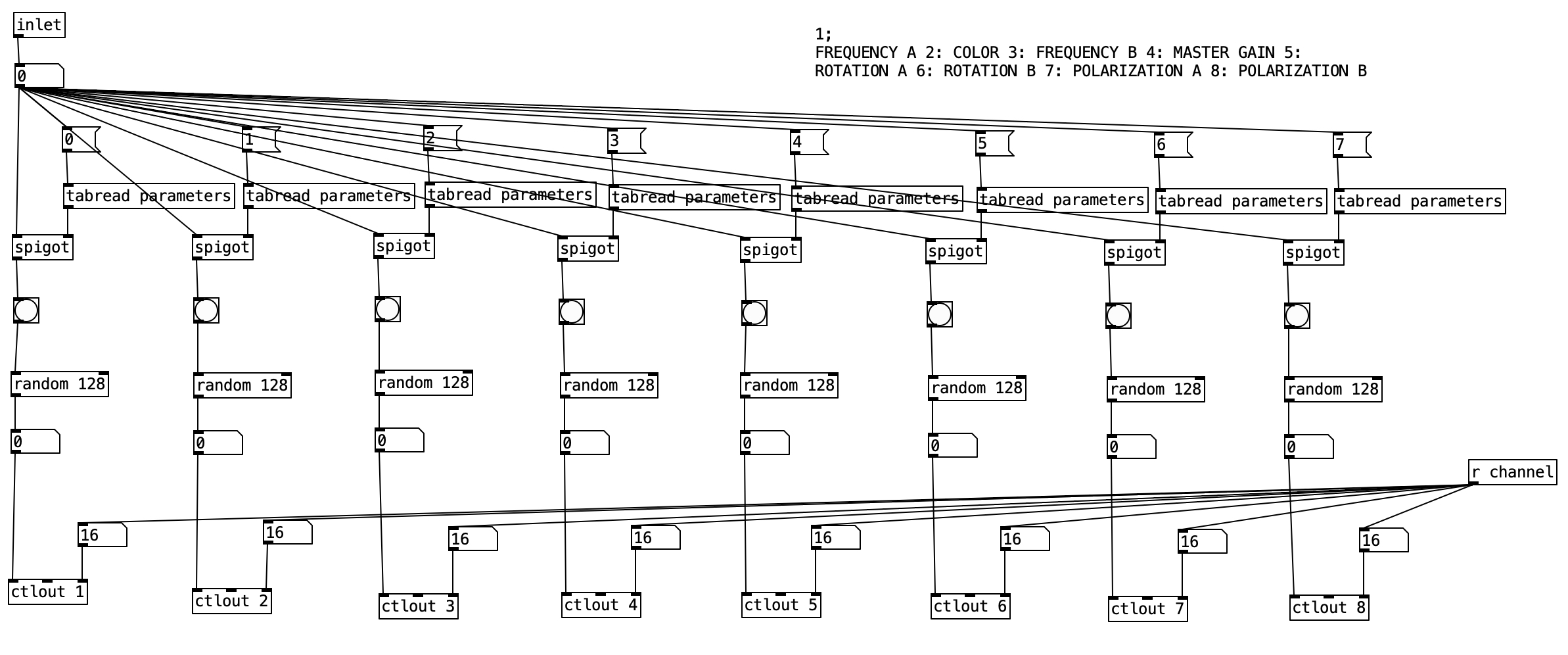
As was the case with the previous experiment, each of the makeautomation subroutines is largely the same, so we’ll look at the first one. This version of makeautomation is far simpler than the one used in the previous experiment. This subroutine is designed to send controller values for the first eight parameters used in the experiment. Each column is largely identical to the rest of the columns. The spigot statement controls whether or not a bang is sent to the random 128 objects below. When the value stored in parameters is zero the bang does not occur, when it is one the bang happens. The random 128 object outputs a value between 0 and 127 inclusive. This takes advantage of the full spectrum available within MIDI specifications. This value is then sent to the Hypno using a ctlout object.
Screenshot

The video input used for this experiment was the video for the next two tracks on Point Nemo, namely 21AC3627AB4 and 87ED21857E5. The video for 21AC3627AB4 is more chaotic in nature than that of 5B4C31. With the abrupt changes, I had though that the latter video would be more chaotic. However, it is likely the tempo change (the former is at 180 beats per minute, while the latter is at 60 beats per minute), that is one of the main contributors to the somewhat calmer flow of 5B4C31.

The sudden changes and the slower tempo require far less MIDI data to be sent to the Hypno, which resulted in far fewer glitches in terms of settings changes that were not specified by the algorithm. This was definitely a big problem with the previous experiment. In fact, there was only one time where one of the oscillator changed shapes, which I manually put back on the video input shape.

I purposefully created the videos for Point Nemo in reverse order, as I wanted the videos to become more simple as the album progresses, having the source video, late afternoon sunlight glistening on waves, gradually reveal itself over a one hour experience. Given that I know what the source video is, I can occasionally see glimpses of it in the first two movements. That being said, there is a considerable step down in complexity between the second and third movement.

Another thing I discovered in this experiment was that many of the visual beats came out quite dark. This can be due to any number of factors, including bad settings for color, for gain, for frequency (zoom) and the like. In order to deal with this, I recorded twice as much video as I needed to, and then simply edited out the dark sections. This required a couple of hours of work, which while somewhat defeats the goal of creating a music video in real time, a couple of hours to create a music video is a fairly easy work load. For future endeavors, I could limit the range of values to avoid such poor settings, or I could come up with algorithms to reject certain results.

In fact, this experiment successful enough that I have devised a rough plan for creating music videos for my forthcoming album, Monstrum Pacificum Bellicosum, which is due out at the end of 2026. Accordingly, I intend to start working on the videos relatively soon. The first part will likely be to find footage to manipulate. The current plan is to find footage from public domain and silent films.

I am fairly pleased with the numbers of streams of the Point Nemo videos on YouTube (5B4C31: 15, 21AC3627AB4: 90, 87ED21857E5: 213, and 364F234F6231: 118), particularly considering that the first video has only been live for less than 24 hours. While those statistics may not seem earth shattering, with the exception of the stats for 5B4C31, these surpass the streams those pieces have had through bandcamp and distrokid, so the videos are definitely helping with the visibility / distribution of the music.

I am considering a public showing the Point Nemo at Stonehill College, and I definitely plan on doing a live concert using the Hypno. However, my elder cat has a lot of health care issues, and so I’m trying to figure out whether it would be better to schedule such events in the Fall or Spring semesters. I am also considering printing out selected individual frames from the Point Nemo videos, and treating them as 2D art pieces. Since I do plan on using the Hypno to create videos for Monstrum Pacificum Bellicosum, I plan on doing studio reports for my work on them, and treating them as part of my Digital Innovation Grant. That being said, it may be several months until I get to the point where I am ready to report on my work for Monstrum Pacificum Bellicosum.
Digital Innovation Grant: July 25th Update

The good news is that the Hypno features robust MIDI implementation. The bad news is that it may not be well implemented. The MIDI specification allows for 127 different continuous controllers, which could do things like changing the volume or panning of a sound. The Hypno makes use of 50 of these, which is far more than most MIDI devices that I am used to. In addition, there are 10 MIDI notes that are used to act as triggers for the Hypno.

I came up with an algorithm in Pure Data that makes use of 35 of the controller values, and one of the triggers. This is where the bad news comes in. When I run the algorithm there are unpredictable results. Namely two of the triggers I do not use are the triggers that change the shape of oscillators A and B. When I run the algorithm those oscillator shapes often change without being directed to do so.

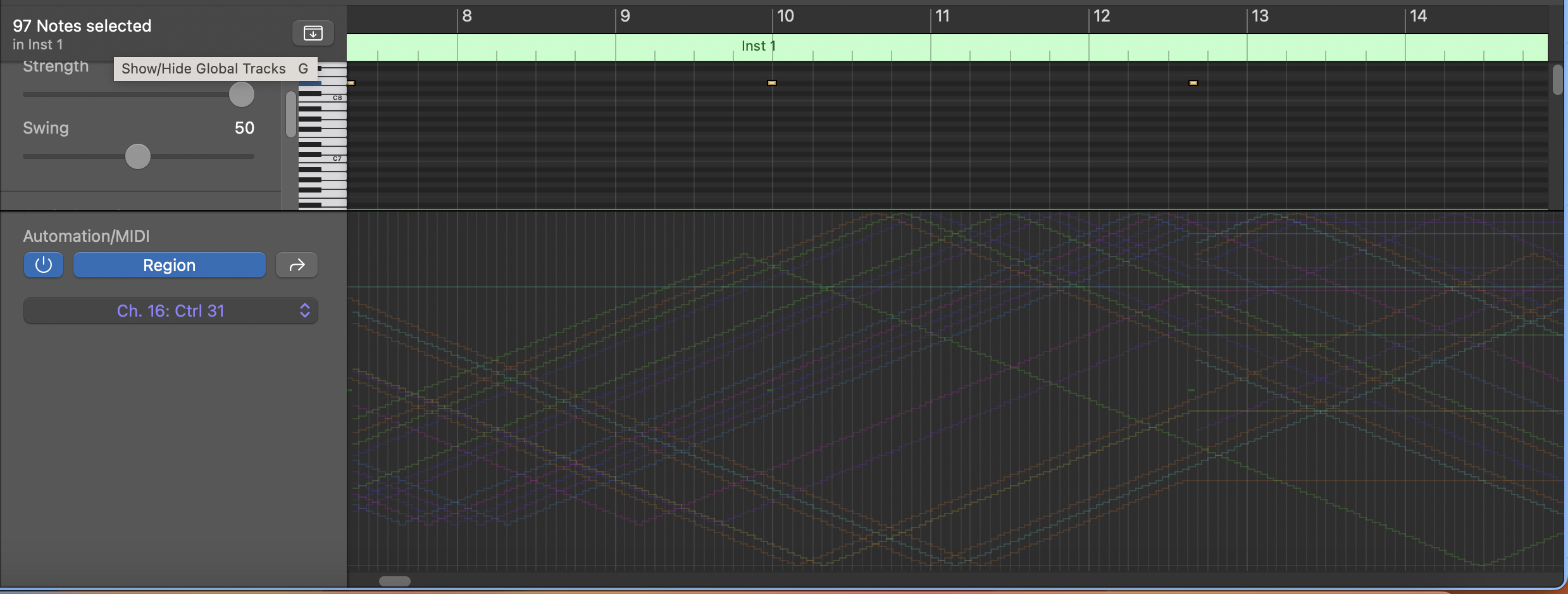
I spent a lot of time troubleshooting the algorithm, including recording the MIDI data in Logic Pro (see below). The MIDI data is coming out of Pure Data exactly as expected. When I cut the algorithm back to sending just one set of values (for instance, the note trigger or one of the controller values), the Hypno responds as predicted, however, sometimes just adding in a second controller, the Hypno begins to change oscillator shapes without being prompted to. It may also be changing other values, that I am simply not able to track. My working theory here is that the Hypno cannot handle a rapid MIDI input of several controller values.

In fact, it was this problem, which I wasn’t able to solve in March that caused me to back burner my work on this project until the summer. Unfortunately the extra time and brain space afforded me by the summer did not yield different results. So, I decided to move forward with the algorithm as it is. My intent with this project was to have both oscillators using the video input shape from stored videos on a USB thumb drive (in this case, video from the previous two experiments, that is video from the final two tracks of Point Nemo). So, in practice, while I was recording the video output from the Hypno, whenever either oscillator shape changed, I changed it back to video input as quickly as I could. Accordingly, this resulted in a bit more chaos to an already chaotic video.

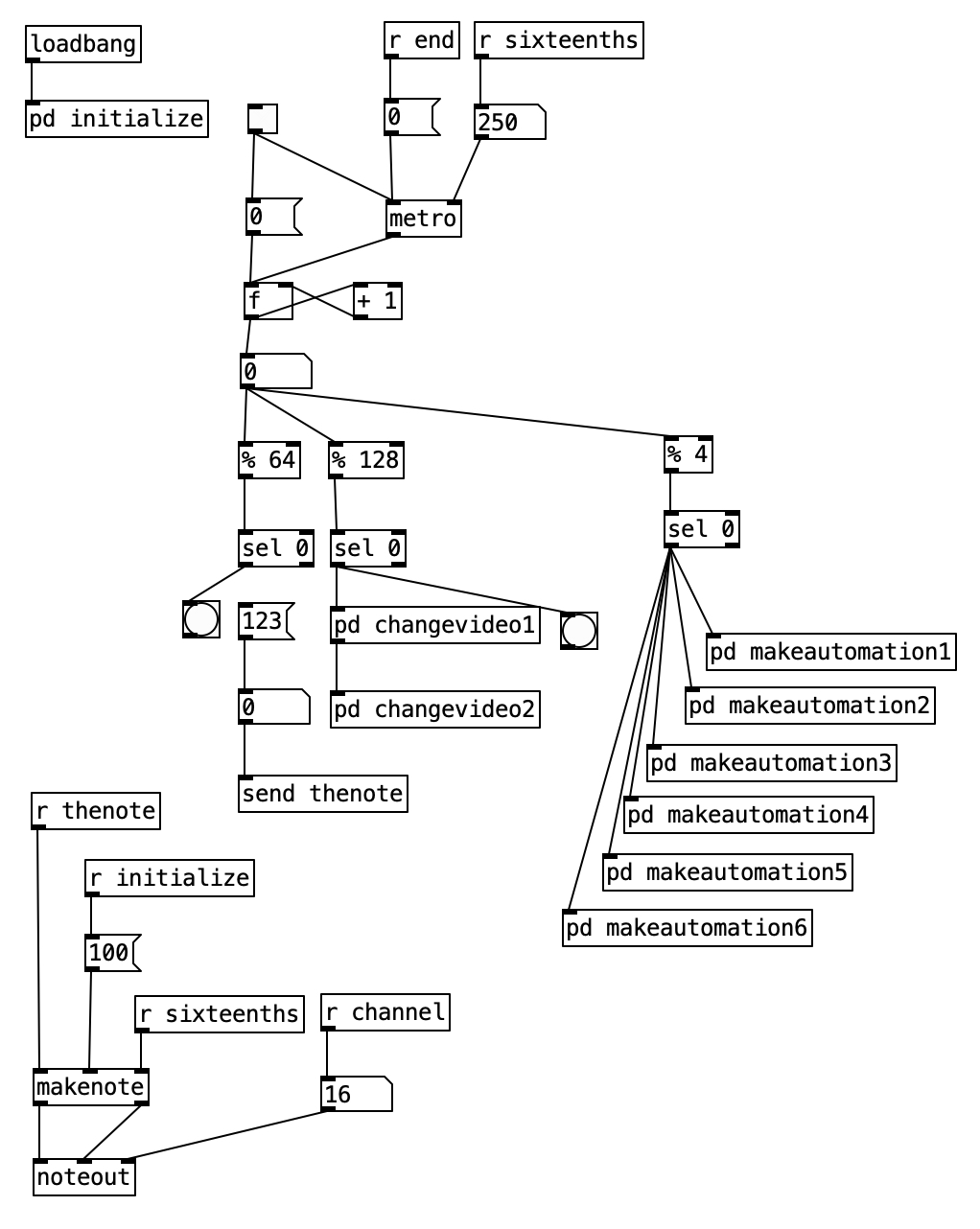
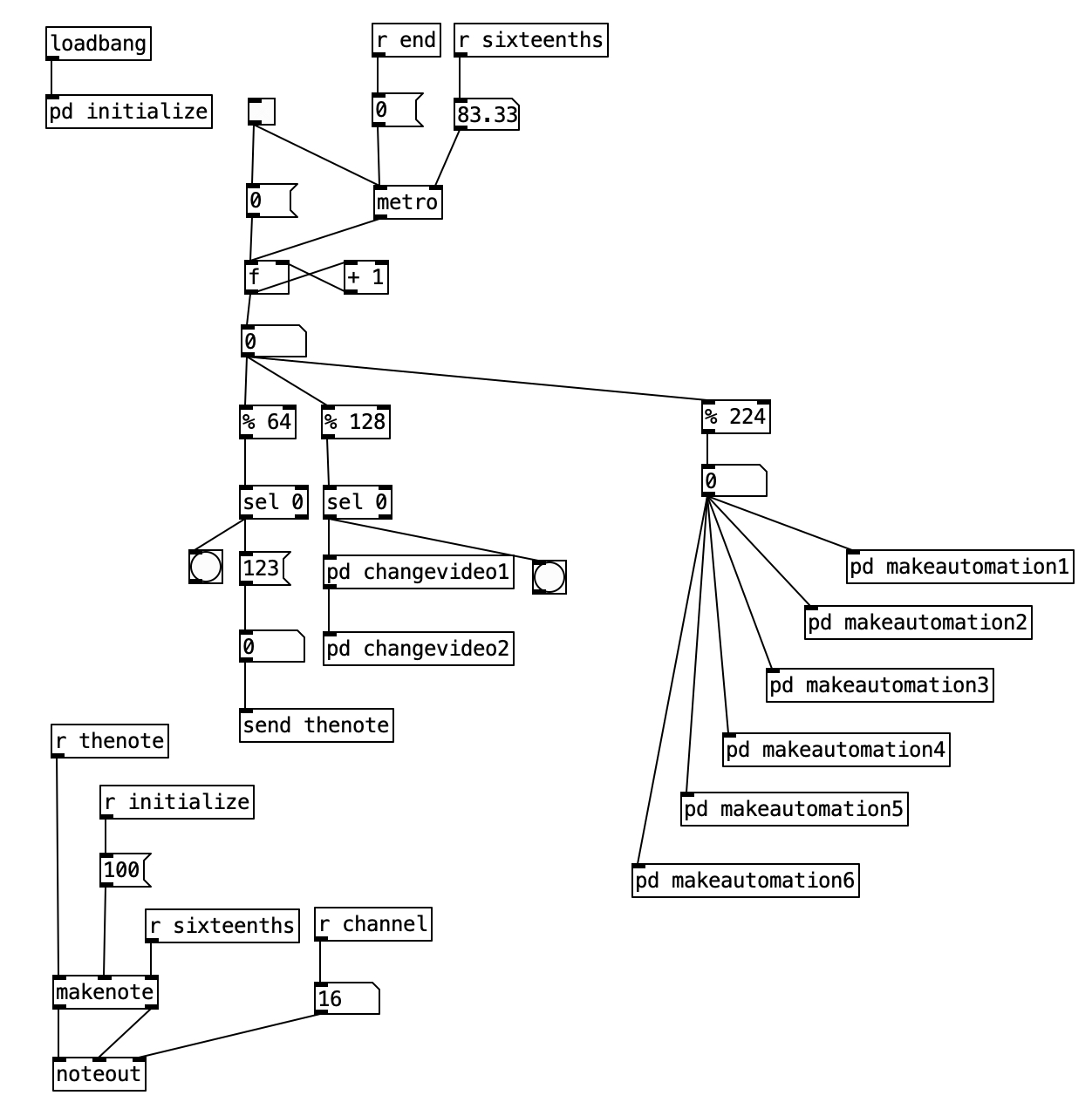
Alright, so let’s look at the algorithm in Pure Data. We see at the bottom left the part of the algorithm that sends the MIDI note out (it ends with a noteout object). In the upper left with see the initialize subroutine, which includes translating the tempo (180 bpm) into an amount of milliseconds. It also includes the initialization of an array called parameters. Finally, it also sets the MIDI channel to channel 16 (the Hypno is locked into channel 16, and it cannot be set to other MIDI channels). In the center of the screen, we see the primary algorithm. It includes a metronome, and a counter right below that. Then beneath the number object below the counter we see three different branches, one ending in a send object, the second ending in two subroutines labeled changevideo, and the final ending in six different subroutines labeled makeautomation.

We have seen various versions of all of these subroutines before. The first, which terminates in [send thenote] simply sends MIDI note number 123 to the Hypno once every four measures (16 sixteenth notes multiplied by four measures equals 64). This is the note number that toggles the feedback mode of the Hypno. The changevideo subroutines occur under a % 128 object. This causes these subroutines to execute once every eight measures (two times 64). The subroutine changevideo2 is similar as changevideo1, so let’s look at changevideo1.

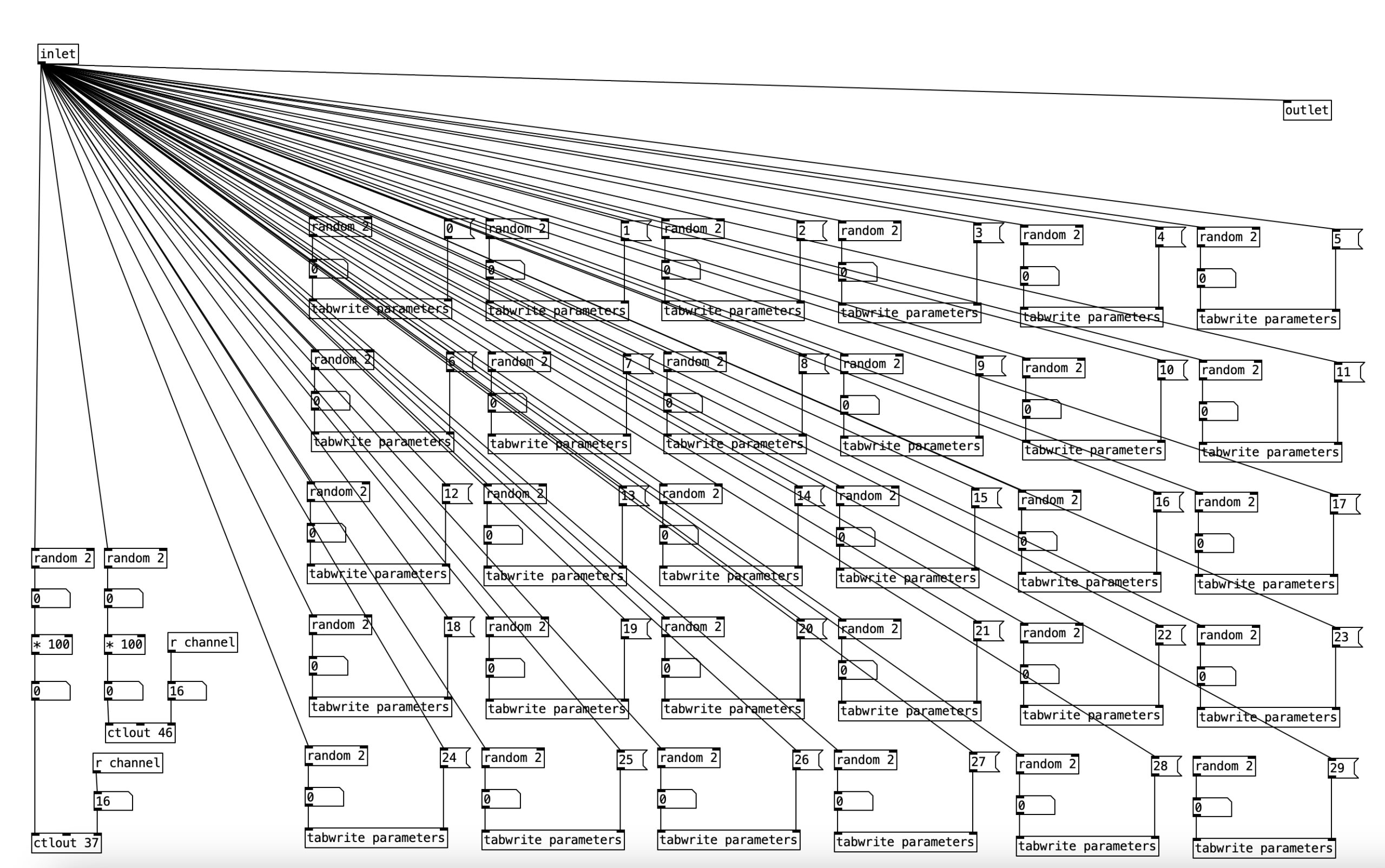
The bulk of this subroutine is 30 instances of a random 2 object followed by a tabwrite parameter object. What this means is that for each of 30 parameters, which will map onto controller values sent to the Hypno, there is a fifty percent chance for that parameter to be set to either change or not change once every eight measures. The changevideo2 subroutine simlply contains the remaining five instances of the parameters.

On the left we see two random 2 objects followed by a * 100 object. In each case, this will result either in the number 0 or the number 100 being output. These are then sent to ctlout 37 or ctlout 46. These are the controller values that set the file index number for oscillators A and B respectively. To put it in other terms, this will cause the video input to toggle between the two video files stored on the USB thumb drive.

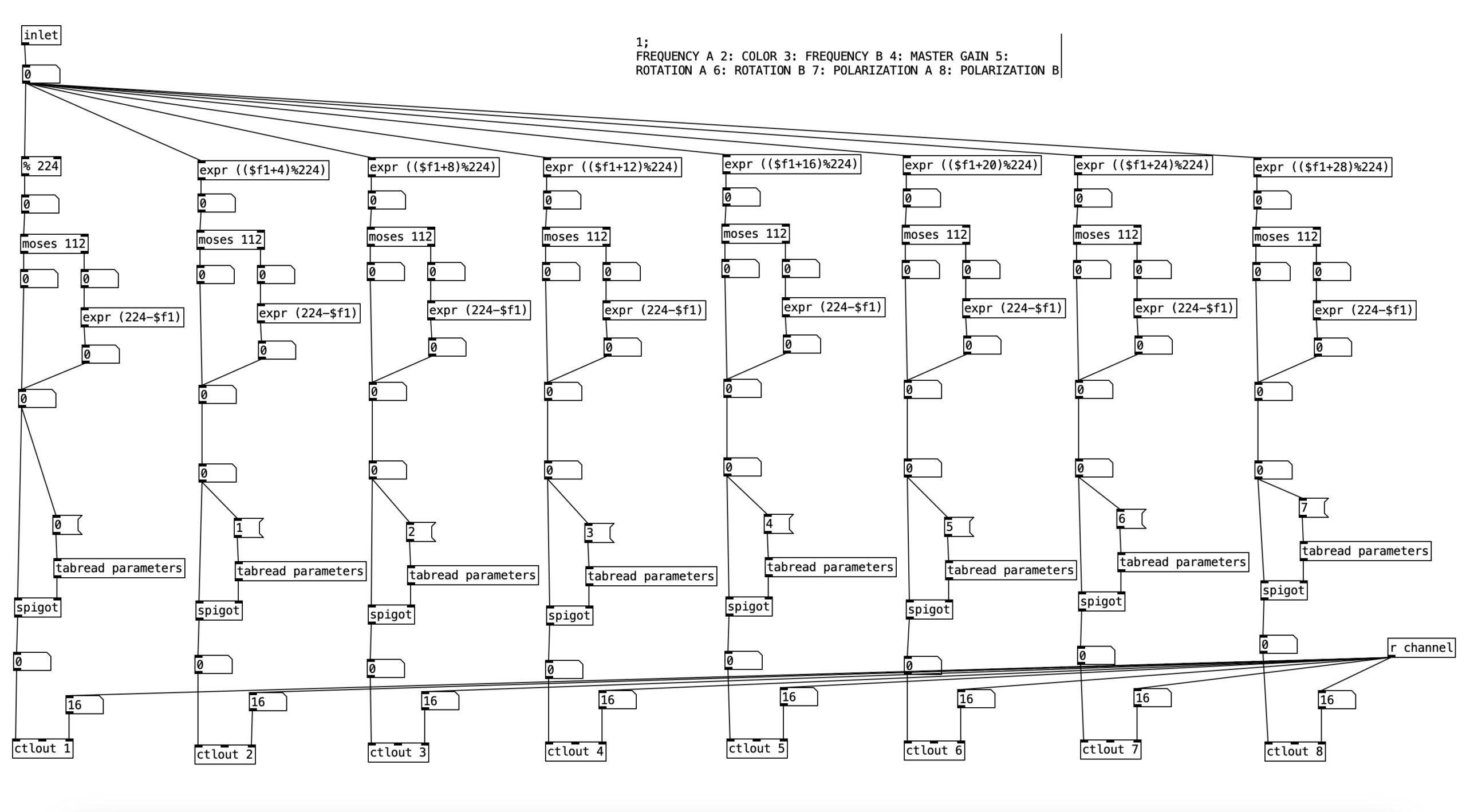
The six makeautomation subroutines are mostly similar to each other, so we’ll look at makeautomation1. This subroutine features eight instances of the same thing. It starts with some version of a mod statement (% 224) or a similar expr object. The number 224 corresponds to 14 measures of music. If we halve that to seven measures the number of sixteenth notes is 112. So why am I dealing with seven minute units here? MIDI controller values range between zero and 127. The number 112 is the largest multiple of 16 that is still less than 127. Each successive expr object increments the incoming value by four before modding the value. This is done so that parameters are not set to the same value.

After the mod or expr object we see a moses object. When the value coming into the left inlet is below the stated value, in his case 112, that value is passed to the left outlet. If it is equal to or above that value, it passes out of the right outlet. This allows us to insert an expr object that subtracts the value from 224. Thus, this will create a motion from 112 down to 0. Thus, what this subroutine does is create incremental parameter changes that result in triangle wave forms. This can be confirmed by looking at the recorded MIDI data in Logic Pro.

After this the value then passes through a spigot object. Here the spigot is being controlled by a value from the parameters array. It that value is 0, the value going into the left inlet does not pass through. When that value is 1, the value at the left inlet will be passed to the outlet. Accordingly, we can see how the subroutine changevideo turns these spigots on and off. The values are then sent to the ctrl objects below.

The subroutine makeautomation1 handles the controllers for the color and the master gain. It also controls the values for frequency, rotation and polarization for both oscillators. The subroutine makeautomation2 handles controllers for oscillator A, including drift, color offset, saturation, fractal axis, and fractal amount. The subroutine makeautomation3 handles the same parameters as the previous subroutine, but for oscillator B. The subroutine makeautomation4 handles values related to feedback including: feedback hue shift, feedback zoom, feedback rotation, feedback X axis, and feedback Y axis. It also handles the controllers for feedback to gain for both oscillators. The subroutine makeautomation5 handles parameters for video manipulation of oscillator A, including X crop, lumakey, Y crop, lumakey max, and aspect A. The final makeautomation subroutine handles the same parameters as the previous subroutine, but for oscillator B.

As an experiment, this video was a success in the sense that it answered the question, can the Hypno handle a lot of MIDI input of controller values. That answer is clearly no. However, while the Hypno did not respond as directed by the algorithm in Pure Data, I cannot say that the results are not satisfying, though they are a considerable leap more chaotic that the results of the previous two experiments. I will be doing one more experiment with driving the Hypno using MIDI data, and will likely continue to use MIDI data when performing with the Hypno. However, when making music videos I will likely use Eurorack control voltages to drive the Hypno, as the results are far more predictable and controllable.

Part of this experiment was to see the outer limits of using MIDI with the Hypno. As already noted, this yielded fairly chaotic results where the source material is almost completely unrecognizable. In practice it seems that I will get more aesthetically pleasing results if I rein in the controller changes, yielding a more subtle response.

Digital Innovation Grant

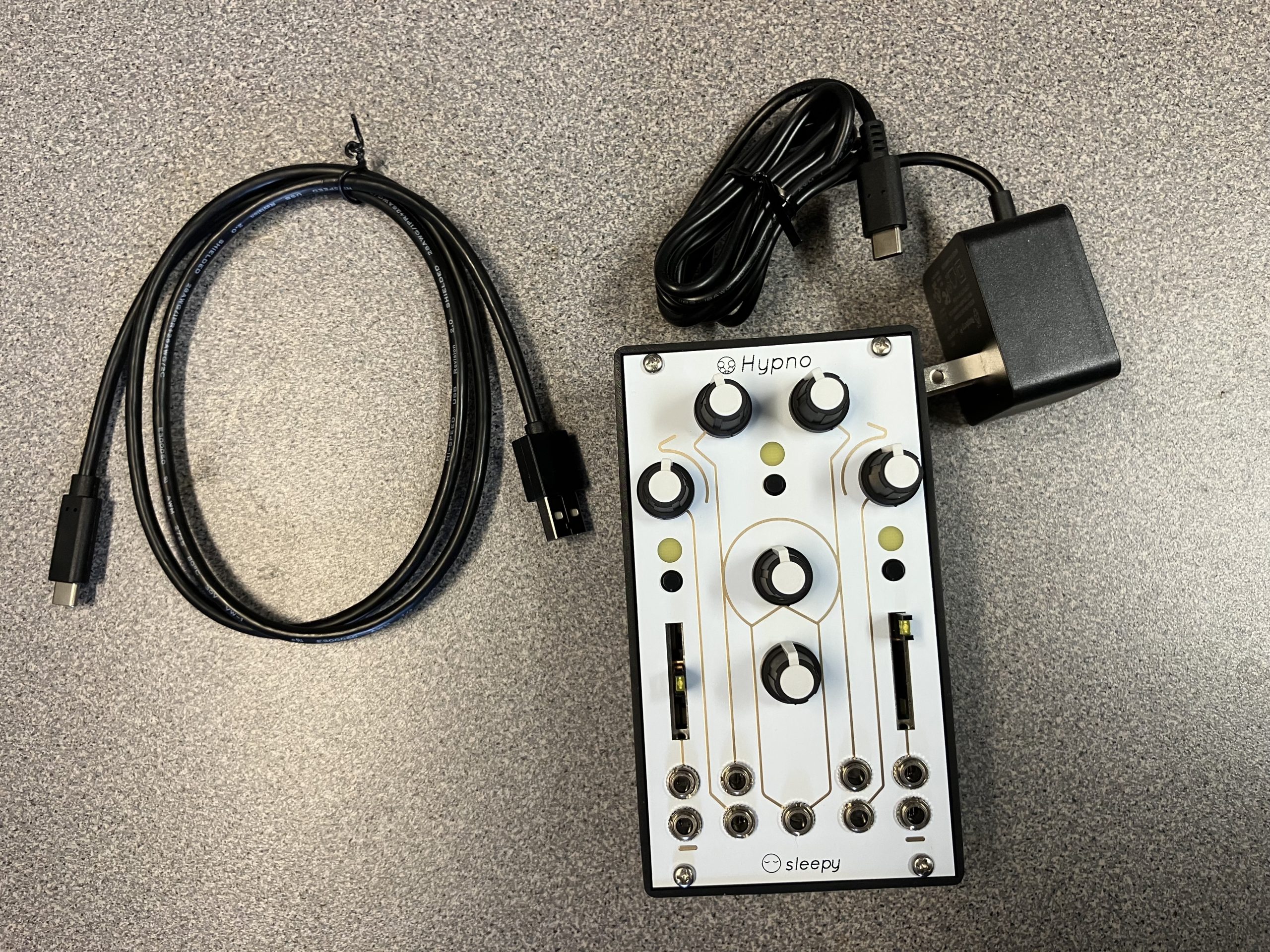
I’m pleased to announce that myself and Professor Katherine Elia-Shannon from Stonehill College’s Communication Department have been awarded a Digital Innovation Grant from the Digital Innovation Lab at the MacPháidín library. The grant will continue my investigation of video synthesis that I started using the Critter and Guitari EYESY from my previous Digital Innovation Grant. This time around I will be using the Sleepy Circuits Hypno.

The Hypno generates video in realtime, and features four USB inputs with an HDMI output. The core of the video generation is two video oscillators that generate what Sleepy Circuits call shapes. These two shapes are superimposed over each other. Various parameters, such as shape, frequency, rotation, and polarization can be controlled for each video oscillator. Likewise, there are global parameters that can be manipulated such as gain, hue, saturation, feedback. These parameters can also be controlled via MIDI over USB or via control voltages from a Eurorack compatible modular synthesizer. In addition to the internal shapes offered by the video oscillators, the Hypno can accept video input via USB as a shape for each of the two video oscillators, allowing the user to manipulate live or pre-recorded video in real time.

The first step will be to create a series of blog entries that explain the various features of the Hypno. This post will be aided by the vast resources on the YouTube channel for Sleepy Circuits. After that, I plan on making music videos for the four pieces on my most recent album, Point Nemo. I will also be teaching the features of the Hypno to Professor Katherine Elia-Shannon and her students for them to use in an assignment.

The first batch of equipment, the Hypno and a power cable, arrived this past week. In July the second half of the grant funding will payout, so at that stage I will be purchasing accessories to use with the Hypno. Stay posted for updates!