Pure Data: Chord Arpeggiator

In the previous post, we had an introduction to patches in Pure Data using a patch that plays a scale in quarter, eighth, and sixteenth notes in three different octaves. In this post we’ll be looking a way to generate diatonic triads using a chord progression. Again, these patches are intended to teach concepts of music theory along with concepts of music technology.
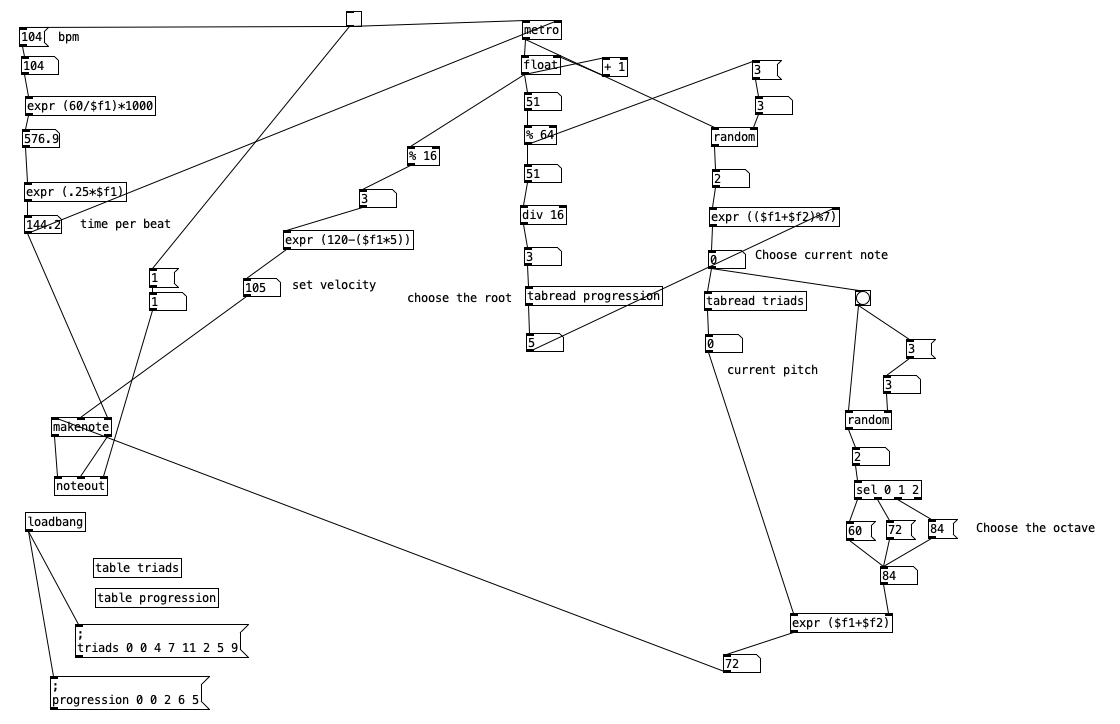
Some portions of this patch are similar to portions of the previous patch, so we’ll give them only a brief mention. For instance, the portion (in the upper left) that translates tempo (in this case 104 beats per minute) into time per beat (expressed in milliseconds) is essentially the same. Here is multiplied by .25 to yield a constant sixteenth note rhythm. Likewise, the portion of the patch that actually makes the notes and outputs them to MIDI (middle left) is essentially the same.
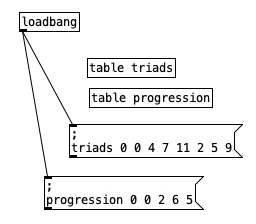
We have previously introduced loadbang and tables. Here we use tables to define diatonic triads in C Major. Using C as zero, triads 0 0 4 7 11 2 5 9 presents the notes of C major in stacked thirds (C, E, G, B, D, F, A respectively). If we pull out three consecutive numbers from this table, we will get a root, third, and fifth of a triad. We can wrap the table around to the beginning using modular mathematics (in this case mod seven) to yield thirds and fifths of the A chord, as well as the fifth of the F chord.

We can define a diatonic chord progression by noting the table position of the root of the chord in the triads table. Accordingly progression 0 0 2 6 5 gives us the roots C, G, A, and F. Given the layout of Major and minor thirds within a Major scale, this gives us the specific harmonies, C Major, G Major, A minor, and F Major. Fans of popular music will recognize this progression from numerous songs, including “Don’t Stop Believing,” “Can You Feel the Love Tonight,” and “Country Roads.”
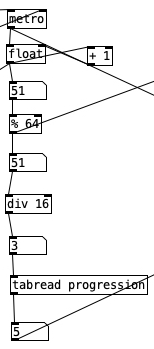
The metronome used in the patch ticks off sixteenth note increments, so the % 64 object beneath the counter reduces the counter to a four measure sequence (four groups of 16 sixteenth notes adds up to 64 notes). This number is used in the object div 16, which yields the whole number portion (non-fractional portion) of the number being divided by 16. This will result in the values 0, 1, 2, or 3. This is essentially the current measure number in terms of the direction. Feeding this to tabread progression. Will give the index value for the root of that measure’s chord when used with the triads table.
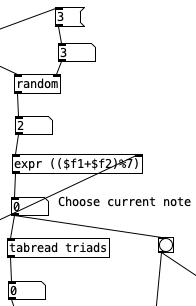
The value from the tabread progression object is sent to the right inlet of the expr statement in the segment above. A random number between 0 and 2 inclusive is fed to the left inlet of the same expr statement. The random number represents whether the note created will be a root (0), a third (1), or a fifth (2). by adding these two values together we get the index of the specific pitch the triads table. Using mod 7, % 7 in the expr statement, insures that if we go beyond the end of the the triads table that we will wrap around the beginning of the table. This index is then passed to tabread triads, which returns the numeric value of the specified note.
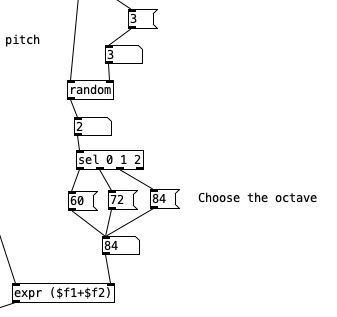
Note that in the previous segment a second outlet from the number object beneath the expr statement is then sent to a bang. This activates the random code in the segment above, namely the selection of a random number between 0 and 2 inclusive. This number is passed to a sel statement, specifically, sel 0 1 2. This object activates one of the three leftmost outlets, depending upon whether it is passed a 0, 1, or 2 (respectively left to right). the rightmost outlet activates if anything besides 0, 1, or 2 is encountered. In this case we pass the three left most outlets to three messages, 60, 72, and 84. These numbers are three different octaves of C (middle C, C5, and C6 respectively). Those messages are fed to a number object, which in turn is fed to the right inlet of an expr statement. The left inlet of this expr statement comes from the output of tabread triads. Thus, in expr ($f1+$f2) the pitch is added to one of three octaves, yielding a random arpeggiation across three octaves of pitch space. Let’s listen to the results of this patch below.
Pure Data: Scale Sequencer

Inspired by the book Learning Music Theory With Logic, Max, And Finale by Geoffrey Kidde, I have decided to revise my curriculum in my entry level theory course. However, rather than use Max, I’ve opted to teach Pure Data, due to its low price ($0). Pure Data is just different enough from Max that you can’t really use teaching materials for the two programs interchangeably. Thus, teaching Pure Data is forcing me to learn it, which is something I’ve wanted to do for quite a while. I hope to put up occasional posts that share Pure Data patches that I have developed for my teaching.

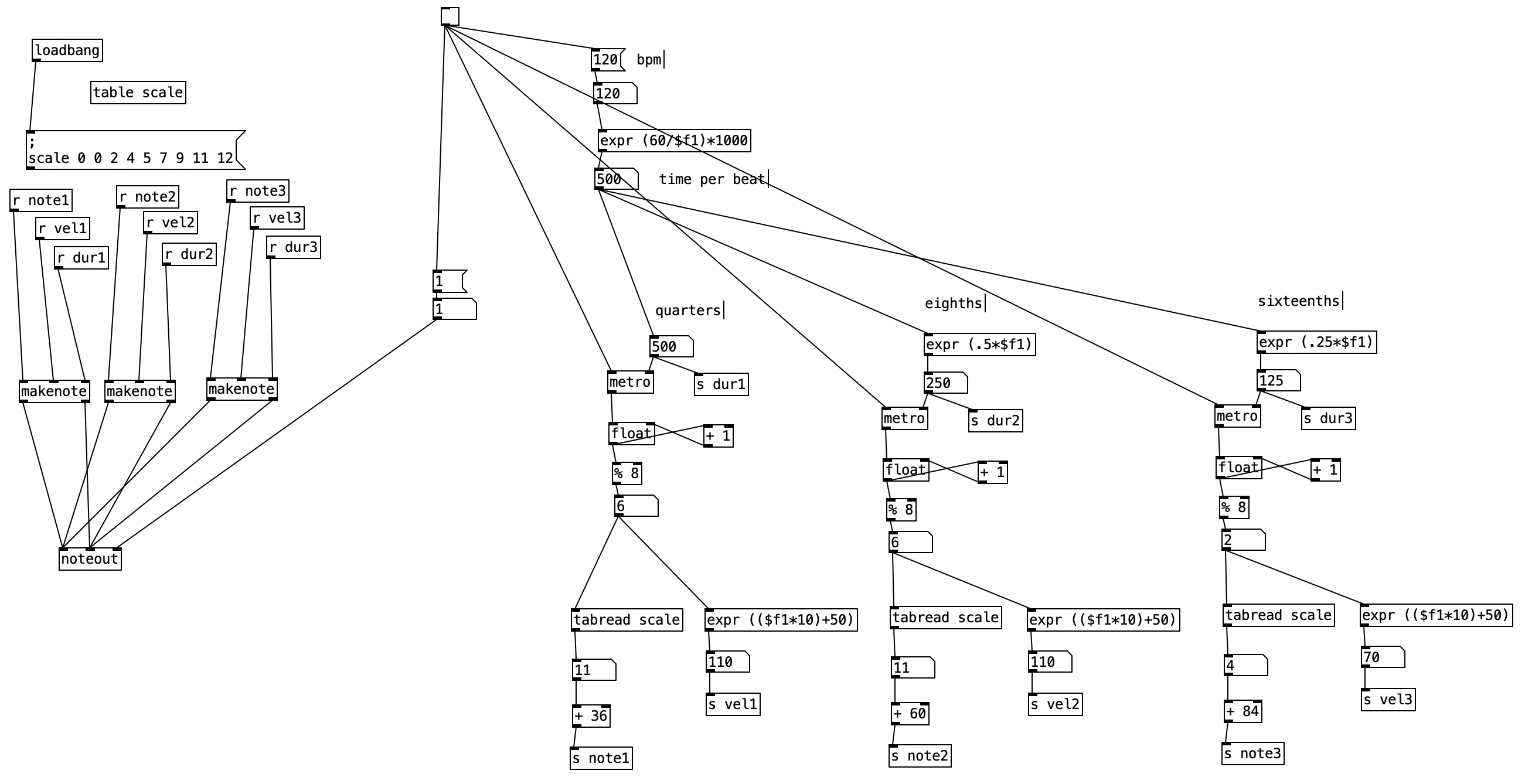
The first of these is a patch that plays major scales in three different octaves, at three different speeds.

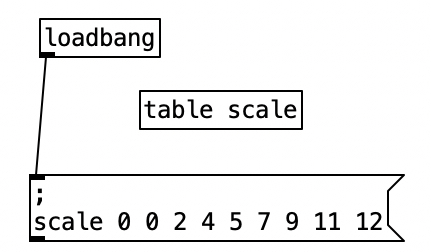
Let’s look at this patch in a little detail. For those who are new to Pure Data, loadbang is used to run part of your patch when that patch is loaded. This loadbang routine sets up a table called scale, and defines the scale. Note that I’m using numbers of half steps to define a major scale (0 2 4 5 7 9 11 12). Notice as well that there is seemingly an extra 0 at the beginning. However, that first 0 indicates where in the table you begin loading material, so if we were to write this as text, we’d say begin at position 0 (the start of the table), and load in 0, 2, 4, 5, 7, 9, 11, and 12. This table data is included in a message object, and starts with a semicolon followed by a return character.  We would change the data in this message to change the mode or type of scale desired. If you want to update the patch after adding or changing information in the message that defines the scale, all you have to do is click on the message object when not in edit mode.

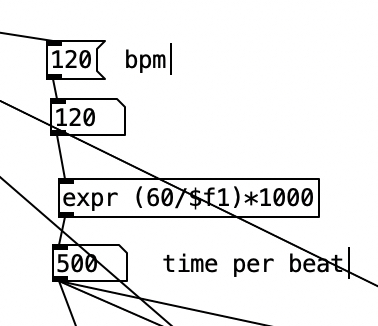
The following segment of the patch translates a tempo, measured in beats per minute to a time per beat measured in milliseconds. The equation expr (60/$f1)*1000 casts the number in the inlet (120) to a float. It divides 60 by that number, resulting in half a second. Multiplying that by 1000 translates that time per beat to milliseconds.

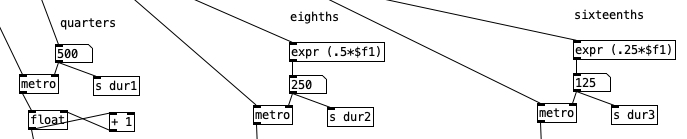
Directly beneath this segment there are three segments that instantiate metronomes at the quarter, eighth, and sixteenth note levels respectively. The quarter note metronome is passed the outlet of the time per beat. For the eighth notes, that same output is halved using expr (.5*$f1). Likewise, the sixteenth note durations result by multiplying by 1/4, using expr (.25*$f). In each case, a duration is also sent (dur1, dur2, dur3).

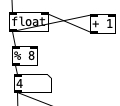
Below the metronomes are counters. The top two objects are very commonly used in Pure Data. The object on the left creates and stores a floating point number (a number with a decimal). To the right, we have an object that increments that number by adding one. This is accomplished by feeding the outlet of the float to the inlet of “+ 1”, and feeding the outlet of “+ 1” into the right inlet sets a new value for the float.

Since a scale has eight notes, any number higher than this is fairly useless for generating a scale. Thus, the outlet of float also feeds to “% 8”. The percentage sign means mod (modulus mathematics). Technically speaking, what is happening here is the number being fed to “% 8” is divided by eight, but the remainder of that division (the number that is left over in whole number division) is then sent to the outlet. This will result in a number between zero and seven.

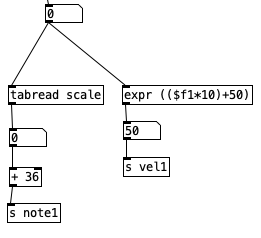
This number is then used to generate both a pitch and a velocity. It is used as an index to select a value out of the the scale table, which is then added to a base pitch to determine the pitch range. The quarter notes use note number 36 as the base pitch. Since middle C (C4) in MIDI (Musical Instrument Digital Interface) is 60, 36 would be two octaves beneath middle C, otherwise known as C2, or Cello C. The eighth notes use middle C (60) as its base, and the sixteenth notes use two octaves above middle C (C6 or 84) as its base pitch. The pitch is then sent via the send command (s for short) using the variables note1, note2, and note3 for the quarters, eighths, and sixteenths respectively.

Key velocity in MIDI is a measurement of how quickly a key is pressed down. Traditionally it is used to indicate how loud a note is. That is a key that is pressed quickly will be louder than a key that is depressed slowly. MIDI is largely a seven bit system, so velocity values run between zero (which also can be used to turn a note off), and 127 (which is the loudest a note can be played). The equation expr (($f1*10)+50) results in having the notes get louder as the pitch of the scale goes up. For instance, when the index is zero, the velocity will be 50, and when the index is seven, the velocity will be 120.

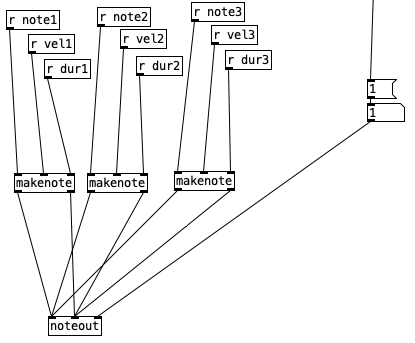
These values, the notes (note1, note2, note3) and the velocities (vel1, vel2, vel3), are then sent to the output stage. The object makenote receives in its inlets (left to right) MIDI note number, velocity (0-127), and duration (in milliseconds). The outlets of makenote then feed the two leftmost inlets of noteout. The rightmost inlet of noteout receives a MIDI channel. The original specifications for MIDI, which was released in 1983, allow for 16 MIDI channels. Here, the notes are being sent on the first channel. Three different instances of makenote are being used here to allow different velocities and durations to be happening simultaneously.

You may check out this patch in action below using a piano sampler from Apple’s LogicPro to realize the sound.